
Biologics records that arrive in Signals complete.

Bionamic analyses and annotates your data with any combination of the tools you already use. The results live in a workbook, where they can be validated interactively and annotated further to match your own Signals material libraries.

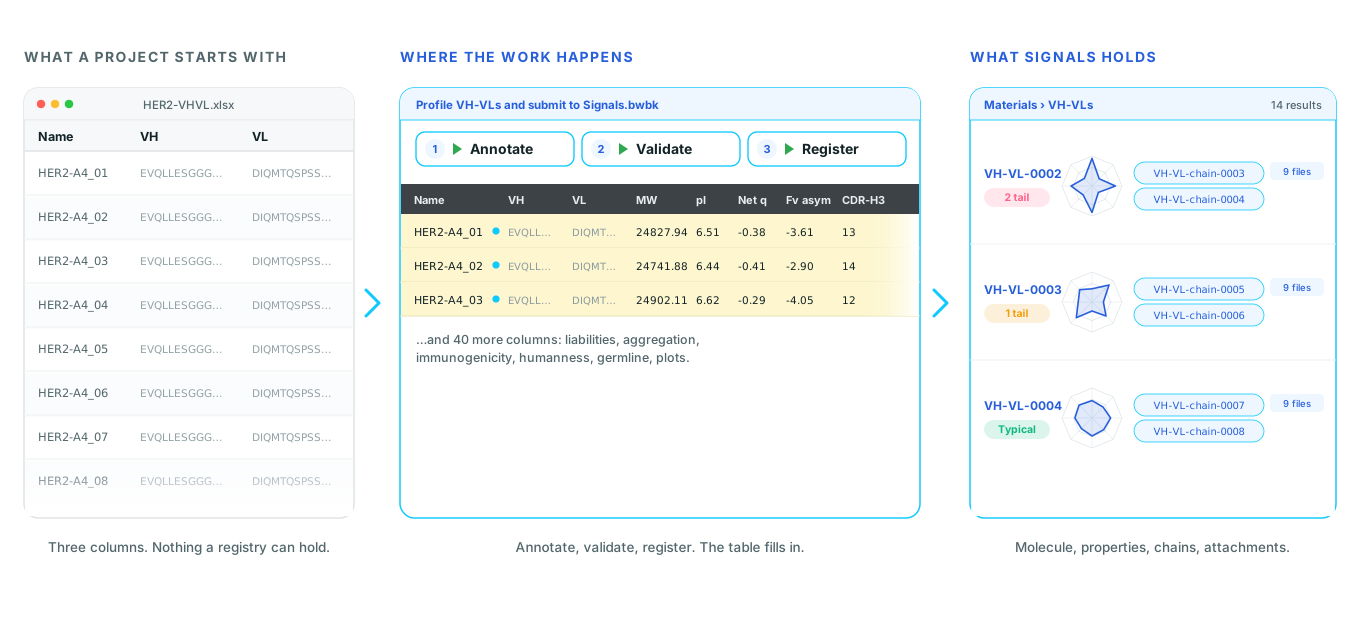
Three panels: a spreadsheet of Name, VH and VL sequences; the same sequences in a Bionamic workbook with Annotate, Validate and Register buttons above a table filled with computed properties; and the antibodies as Signals records with developability plots, linked chains and a status

Three steps, run from the workbook.

Annotate, validate, register. All three read the library definition from your tenant as it is right now, so the workbook and Signals cannot hold different ideas of what a record needs.

01

Annotate: produce what the record has to carry.

The open-ended step, and the one that differs most between projects. Whatever your library asks for, this is where it gets built, computed or derived.

The first step transforms the data you have into the data you need.

It is done by combining the tools Bionamic ships with. A representative selection is below, not the full list. A workflow uses the few it needs, in whatever order the project calls for.

Structure prediction and modelling

  • Boltz-2
  • Chai-1
  • ABodyBuilder2
  • NanoBodyBuilder2
  • TCRBuilder2

Complexes with protein, ligand, DNA and RNA; antibody Fv from VH and VL, nanobodies and TCRs, with per-residue predicted error.

Design and mutation scanning

  • RFdiffusion
  • RFantibody
  • ProteinMPNN
  • ProteinMPNN-ddG
  • AntiFold
  • ESM-IF1
  • ThermoMPNN

De novo backbones against a chosen antigen and epitope, sequence design on a fixed backbone, and exhaustive point-mutation scans for fitness and ΔΔG.

Developability and biophysics

  • Antibody profiling
  • Therapeutic nanobody profiler
  • DeepSP
  • DeepViscosity
  • Aggrescan3D
  • NetSolP
  • MusiteDeep
  • SEMA-3D

Aggregation, viscosity, solubility, phosphorylation sites and conformational B-cell epitopes.

Humanness and immunogenicity

  • BioPhi
  • OASis
  • Sapiens
  • MHCflurry
  • MHCfovea
  • MixMHC2pred
  • TLimmuno2
  • DeepImmuno

Humanness scoring and humanisation, MHC-I and MHC-II binding, and immunogenicity prediction.

Language models and small molecules

  • AMPLIFY
  • ADMET-AI
  • GNINA

Protein language model likelihoods and embeddings, 49 ADMET endpoints from SMILES, and docking with CNN pose and affinity rescoring.

Sequence search and alignment

  • BLAST
  • HMMER
  • MMseqs2
  • DIAMOND
  • CD-HIT
  • Clustal Omega
  • seqkit

Numbering and germlines

  • ANARCI
  • IgBLAST
  • IMGT germline search

IMGT, Kabat, Chothia, Martin and Aho, plus a fast in-house numbering tool.

Repertoires and NGS

  • OAS paired and unpaired
  • SAbDab
  • FASTQ to HMM counting
  • Library mapping
  • Sanger AB1

Display-library counting with pre and post selection, closest-member matching and profile HMM building.

Docking, structure and surfaces

  • AutoDock Vina
  • GNINA
  • LightDock
  • US-align
  • Foldseek
  • PyMOL
  • SASA

Including a prebuilt antibody structure database and surface property mapping.

Simulation and cheminformatics

  • GROMACS
  • OpenMM
  • APBS
  • PDB2PQR
  • PROPKA
  • RDKit
  • ProtParam
  • Codon optimisation

Molecular dynamics on GPU, electrostatics, descriptors and properties from SMILES.

The antibody walkthrough below uses a handful of these. Another project might assemble a multi-chain molecule, construct an expression vector, derive batch information or call a model of your own. The two steps that follow do not change when this one does, because they read the library rather than the tool.

The antibody example

From pasted sequences to a profiled table.

VH and VL sequences, pasted straight from Excel. Sequences also come in from FASTA and GenBank files, and from ABI trace files off the sequencer, so a project can start from whatever its data already is.

Selected rows are then folded and run through the developability, immunogenicity and humanness tools. The molecule is built with its CDR and liability features, and the computed properties land back in the same table, in columns named for the Signals fields they will fill. That naming is what lets the next two steps work against the library rather than against a mapping table.

02

Validate: against the live library, before anything is written.

Reads the library definition from the tenant and checks the table against it. Nothing is sent to Signals in this step.

What it does

Adds the columns the record needs, then says what is still missing.

Every field without a column gets one, because a required Target cannot be filled in, or reported as missing, until there is somewhere to put it. The live rules are then written into the workbook itself, so mandatory fields are marked and dropdowns are constrained to their real options at the point where someone is typing, rather than being rejected later.

What remains is reported per row and summarised by field: twelve rows missing Target, not twelve near-identical errors.

03

Register: chains first, then the record that links them.

Registers the assets, with their attachments, and writes what Signals assigned back into the workbook.

What it does

One pass, and safe to run twice.

Each chain is registered in the chains library keyed on its sequence, so a chain shared by two constructs is registered once and linked twice. The record follows, linking those chains and carrying its attachments. Assigned names and entity IDs come back into the table, which is what makes the workbook and the registry agree afterwards.

Identity is a fingerprint derived from the sequences, so re-running finds the existing asset and reuses it rather than creating a second one.

What ends up on the record.

From the antibody example above. The field names are your library's, and the scripts match on what the tenant reports, so renaming a field in Signals changes what is filled, with no mapping table to keep in step and nothing to redeploy.

Identity and provenance

  • Deterministic ID, derived from the sequences and used for the uniqueness check
  • Link to the registered VH and VL chain assets
  • Project, target, species
  • Date analysed

Developability

  • Molecular weight, isoelectric point
  • Net charge at pH 7.4 and pH 5.5, Fv charge asymmetry
  • CDR-H3 and CDR-L3 length
  • Sequence liabilities, and which of them fall in CDRs
  • Aggregation propensity, aggregation-prone residues, exposed hydrophobics

Immunogenicity and humanness

  • MHC-II strong binders, epitope hotspots, peak epitope coverage
  • OASis humanness percentile, per chain
  • Proposed humanising mutations, per chain
  • Closest human germline V and J, and residues differing from it, on each chain

Attachments

  • Developability radar against clinical-stage antibodies
  • Aggregation, exposure and immunogenicity profiles
  • Hydrophobicity, stickiness and electrostatics surface maps
  • The folded Fv structure
  • The underlying aggregation data

What it takes to stand up.

A library definition.

Created once in the tenant, with the fields the project wants. It is an ordinary Signals material library. Nothing about it is Bionamic-specific, and it stays yours to change.

A credentials file.

Tenant URL and API key, in one file in the workspace. Read when a script runs, so pointing the same workbook at another tenant is a file swap, and rotating a key touches one place.

The scripts.

Run from the workbook, beside the table they act on. They read the library rather than embedding it, so a new field is a change in Signals, not a change in code.

What this is not.

Have a customer with this problem?

We are glad to walk through it in a tenant, against a library you care about, and to answer the questions that come up in the room.